

Cloud computing has transformed how businesses build, deploy, and scale applications. Instead of investing heavily in physical hardware and maintaining complex IT infrastructure, organizations now rely on cloud services for flexibility, scalability, and cost efficiency.
What Is Cloud Infrastructure as a Service (IaaS)?
One of the foundational pillars of cloud computing is Infrastructure as a Service (IaaS). It provides businesses with virtualized computing resources over the internet, eliminating the need for on-premise infrastructure.
In this comprehensive guide, we’ll explore what IaaS is, how it works, its key components, benefits, use cases, challenges, and how it compares to other cloud service models.
What Is Infrastructure as a Service (IaaS)?
Infrastructure as a Service (IaaS) is a cloud computing model that delivers essential IT infrastructure such as virtual machines, storage, networking, and operating systems on a pay-as-you-go basis over the internet.
Instead of purchasing and managing physical servers, data centers, and networking hardware, businesses can rent these resources from cloud providers.
Key Idea:
IaaS provides maximum control and flexibility, allowing users to manage operating systems, applications, and configurations while the cloud provider handles the underlying hardware.
How IaaS Works
IaaS works through virtualization technology, where physical hardware is divided into multiple virtual environments.
Step-by-Step Process:
Cloud Provider Setup: Data centers with servers, storage, and networking hardware are set up.
Virtualization Layer: Hypervisors divide physical resources into virtual machines (VMs).
User Access: Users access infrastructure via dashboards, APIs, or CLI tools.
Resource Allocation: Users can provision computing power, storage, and networks on demand.
Billing: Charges are based on usage (compute hours, storage, bandwidth).
Core Components of IaaS
1. Compute (Virtual Machines)
Virtual machines simulate physical computers. Users can choose configurations based on CPU, RAM, and OS.
2. Storage
Block storage (like hard drives)
Object storage (for large-scale data)
File storage (shared systems)
3. Networking
Virtual networks
Load balancers
IP addresses
Firewalls
4. Virtualization
The technology that enables multiple virtual systems on one physical server.
5. Management Tools
Dashboards and APIs for provisioning, monitoring, and scaling infrastructure.
Key Features of IaaS
On-demand resource provisioning
Pay-as-you-go pricing
High scalability
Automation and orchestration
Full control over OS and applications
Disaster recovery support
Benefits of Infrastructure as a Service
1. Cost Efficiency
IaaS eliminates the need for:
Hardware purchases
Data center maintenance
IT infrastructure staff overhead
You only pay for what you use.
2. Scalability and Flexibility
Scale resources up or down instantly based on demand.
Example:
Increase server capacity during peak traffic
Reduce resources during low usage
3. Faster Deployment
Provision infrastructure in minutes instead of weeks.
4. High Availability
Cloud providers offer:
Redundant systems
Global data centers
Uptime guarantees (SLAs)
5. Disaster Recovery
Data backups and failover systems ensure business continuity.
6. Full Control
Unlike other cloud models, IaaS gives:
Root access to servers
Custom configurations
Software installation freedom
Common Use Cases of IaaS
1. Website Hosting
Businesses host websites without managing physical servers.
2. Application Development and Testing
Developers can:
Create test environments
Experiment without affecting production
3. Big Data Analytics
IaaS supports:
Data processing
Storage of large datasets
AI/ML workloads
4. Backup and Disaster Recovery
Cloud-based backups ensure quick recovery.
5. High-Performance Computing (HPC)
Used for:
Scientific research
Financial modeling
Simulations
6. Startup Infrastructure
Startups avoid upfront infrastructure costs and scale as they grow.
IaaS vs PaaS vs SaaS
Understanding how IaaS compares with other cloud models is crucial.
FeatureIaaSPaaSSaaSControlHighMediumLowManagementOS & appsApps onlyFully managedFlexibilityMaximumModerateLimitedUse CaseInfrastructureDevelopmentEnd-user apps
Summary:
IaaS → Build everything from scratch
PaaS → Focus on development
SaaS → Use ready-made software
Leading IaaS Providers
1. Amazon Web Services (AWS)
EC2 (compute)
S3 (storage)
VPC (networking)
2. Microsoft Azure
Virtual Machines
Blob Storage
Azure Networking
3. Google Cloud Platform (GCP)
Compute Engine
Cloud Storage
Virtual Private Cloud
4. IBM Cloud
Enterprise-grade solutions
AI integration
Types of IaaS Deployment Models
1. Public Cloud
Shared infrastructure
Cost-effective
Examples: AWS, Azure
2. Private Cloud
Dedicated infrastructure
Higher security
Used by enterprises
3. Hybrid Cloud
Combination of public and private
Flexible workloads
4. Multi-Cloud
Using multiple providers
Avoid vendor lock-in
Security in IaaS
Security in IaaS follows a shared responsibility model:
Cloud Provider Handles:
Physical security
Hardware maintenance
Network infrastructure
User Handles:
OS updates
Application security
Data protection
Access management
Challenges of IaaS
1. Complexity: Managing infrastructure requires technical expertise.
2. Security Risks: Misconfigurations can lead to vulnerabilities.
3. Cost Management: Without monitoring, costs can escalate quickly.
4. Vendor Lock-In: Switching providers can be difficult.
5. Downtime Risks: Though rare, outages can impact services.
Best Practices for Using IaaS
1. Optimize Costs
Use auto-scaling
Shut down unused resources
2. Implement Security Measures
Firewalls
Encryption
Identity management
3. Monitor Performance
Use monitoring tools
Track usage and performance
4. Backup Regularly
Automate backups
Test recovery plans
5. Use Infrastructure as Code (IaC)
Automate deployments
Ensure consistency
Future of IaaS
The future of IaaS is evolving with:
1. AI Integration: Smarter infrastructure management using AI.
2. Serverless Computing: Less infrastructure management, more automation.
3. Edge Computing: Processing data closer to users.
4. Green Cloud Computing: Sustainable and energy-efficient data centers.
5. Increased Automation: Self-healing infrastructure and auto-optimization.
When Should You Use IaaS?
Choose IaaS if you need:
Full control over infrastructure
Custom application environments
Scalable computing resources
Cost-effective IT solutions
Rapid deployment capabilities
When Not to Use IaaS
Avoid IaaS if:
You lack technical expertise
You need simple, ready-to-use software
You prefer fully managed solutions
Real-World Example
Imagine an e-commerce company:
Uses IaaS to host its website
Scales servers during sales
Stores customer data securely
Runs analytics for recommendations
Without IaaS, this would require massive infrastructure investment.
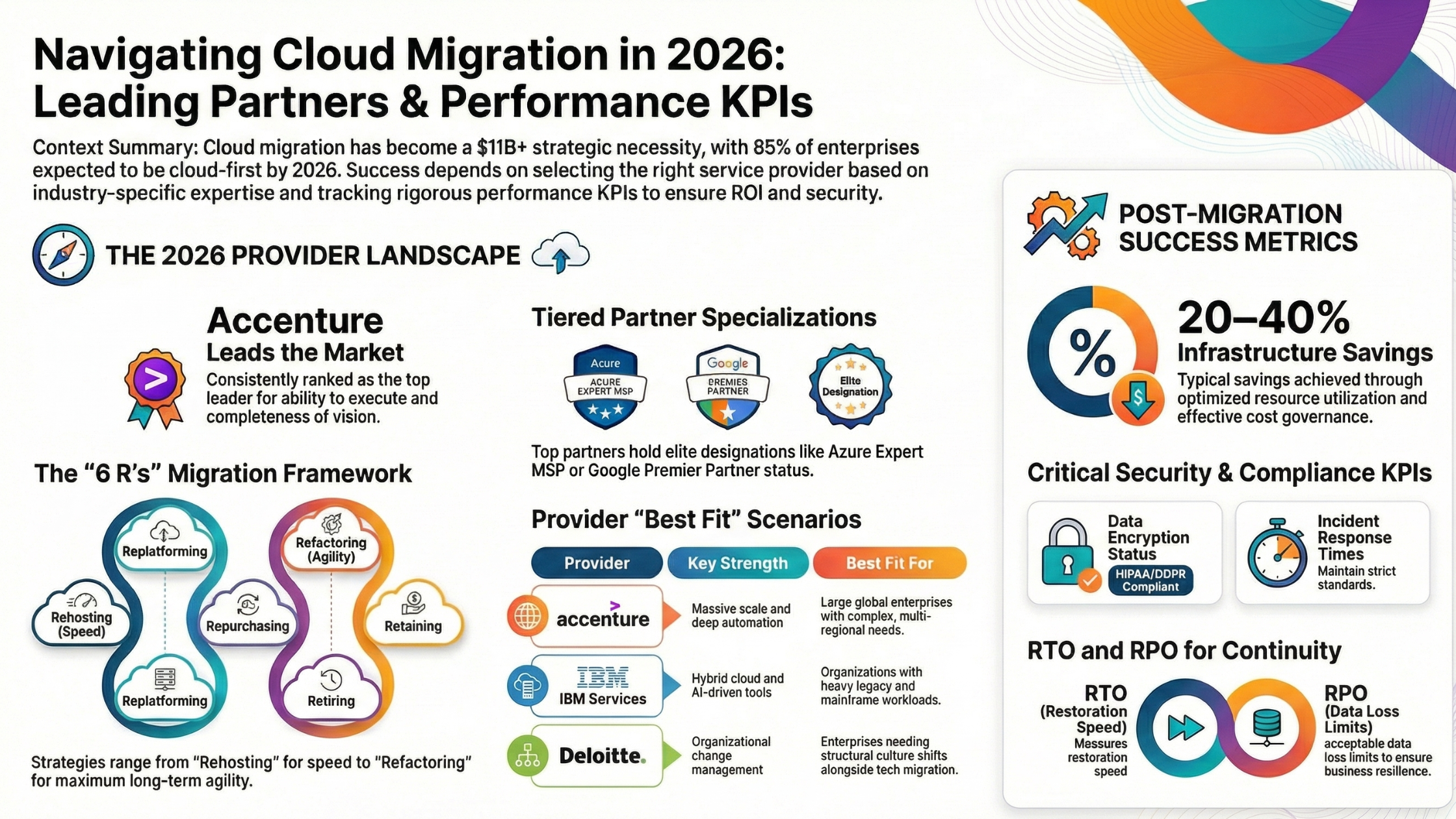
Read More: How to Find a Reliable Cloud Migration Partner
Conclusion
Infrastructure as a Service (IaaS) is a powerful cloud computing model that provides businesses with flexible, scalable, and cost-effective IT infrastructure. It eliminates the need for physical hardware while offering full control over computing resources.
Whether you're a startup looking to scale quickly or an enterprise managing complex workloads, IaaS offers the foundation needed to build modern, resilient, and high-performing applications.
As cloud technologies continue to evolve, IaaS will remain a critical component of digital transformation strategies worldwide.